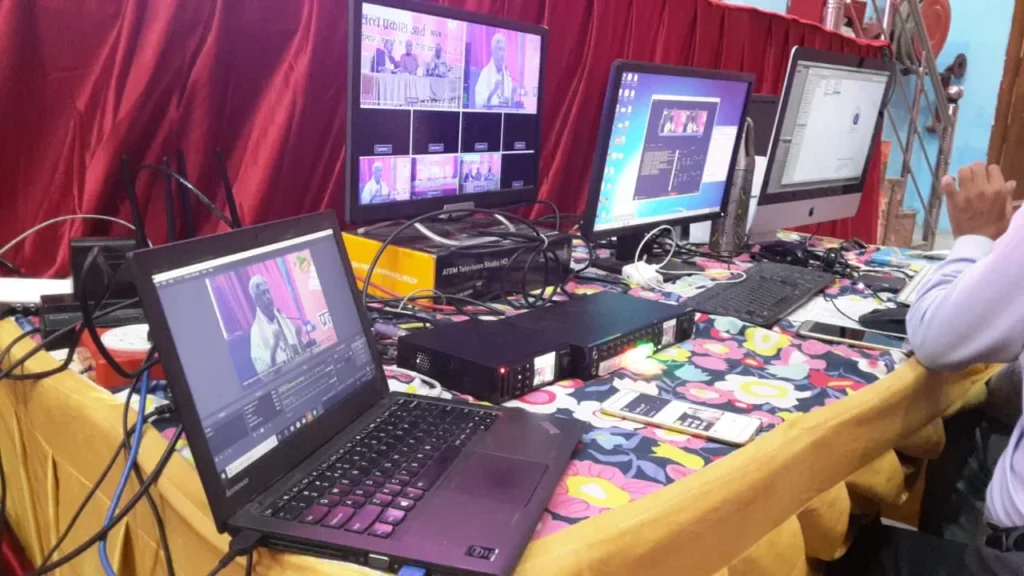
When you watch a professional live stream, it often looks simple—just press play and the event unfolds. But behind that smooth viewing experience lies a carefully orchestrated technical operation involving cameras, audio systems, live production switching, graphics, internet connectivity, streaming platforms, and recording infrastructure. This behind-the-scenes complexity is what separates amateur streaming from professional broadcasting.
Technical broadcasting refers to the complete technical infrastructure and planning required to deliver high-quality live video content to remote audiences. Whether you’re organizing a corporate conference, sports tournament, religious ceremony, educational webinar, or cultural programme, proper technical planning directly impacts viewer engagement, message clarity, and overall event success. For organizations in Delhi/NCR considering professional live streaming, understanding these technical fundamentals helps in making informed decisions about production requirements and provider selection. Shriji Broadcasting, a Delhi/NCR-based media and broadcasting business, operates within this professional live streaming and video production landscape, serving various event categories through its broadcasting capabilities.
What Is Technical Broadcasting?
Technical broadcasting encompasses the combination of video capture, audio engineering, live production, connectivity infrastructure, and distribution platforms required to transmit live video content to remote viewers. Think of it as the technical backbone that transforms a physical event into a professional-quality digital broadcast accessible anywhere with internet connectivity.
The distinction between simple live streaming and professional live broadcasting lies in technical depth and production quality. A smartphone livestream might use a single camera with built-in audio and direct platform upload. Professional live broadcasting, however, typically involves multiple cameras capturing different angles, dedicated audio mixing from the venue’s sound system, live switching between video sources, branded graphics overlays, stable high-bandwidth internet connections with backups, and distribution across one or more streaming platforms.markus-hagner-
Technical complexity varies significantly depending on event requirements. A small webinar might need one camera and basic audio, while a multi-day conference with keynote speakers, panel discussions, and audience interaction could require three to five cameras, professional audio mixing, presentation integration, and multi-platform distribution. The number of speakers, venue size, audience expectations, platform requirements, and production goals all influence the technical broadcasting approach. Organizations should assess their specific needs rather than assuming one setup fits all scenarios.
How a Professional Live Broadcast Works
Understanding the workflow of a professional live broadcast helps clarify where technical planning matters most. The process typically follows this sequence:
Cameras capture video from different angles—wide shots establishing the venue, medium shots of speakers, close-ups for emphasis, and audience reaction shots. Each camera feeds into a central production system.
Audio is captured separately from the venue’s mixing desk or dedicated microphones, ensuring clear sound independent of camera positioning. Professional audio is critical because viewers tolerate video quality issues more readily than poor audio.
Production and switching happens through a video switcher or production software where a director selects which camera feed or graphic appears at each moment. This creates dynamic, engaging broadcasts rather than static single-angle streams.
Graphics such as lower-thirds, logos, titles, and transitions are added during production to enhance branding and information delivery.
Encoding and transmission converts the programme signal into a digital stream suitable for internet delivery, using hardware or software encoders that compress video efficiently while maintaining quality.
Streaming platforms like YouTube, Facebook, or LinkedIn receive the encoded stream and distribute it to viewers across devices.
Viewers access the broadcast through platform links, embedded players, or apps, ideally experiencing smooth playback with synchronized audio and video.
Multi-Camera Live Streaming
Multi-camera live streaming means using two or more cameras simultaneously to capture an event from different perspectives, then switching between these feeds during the broadcast. This approach creates a more dynamic, professional viewing experience compared to single-camera streams.
Consider how different event types benefit from multiple camera angles:
Corporate events might use one camera for the main speaker, another for presentation slides or screens, and a third for audience reactions or panel discussions. This variety keeps remote viewers engaged and ensures important content is clearly visible.
Sports broadcasting typically employs a main action camera following play, a wide shot showing field positioning, and additional cameras for scoreboards, sidelines, or specific athletes. Multi-camera coverage captures the full sporting experience for remote audiences.
Religious events often benefit from a ceremony-focused camera, a speaker close-up camera, and a wider venue shot showing the congregation or overall atmosphere. This combination serves both devotional viewing and informational purposes.
The number of cameras should match event complexity and budget. While three cameras often provide good coverage for standard events, some productions may need only two, while large conferences might use five or more.
Why Multi-Camera Streaming Can Improve a Broadcast
Multi-camera setups offer several advantages when properly executed. They provide more visual choices for the director, enabling smoother transitions and better pacing. Different camera angles ensure important moments aren’t missed due to poor framing. Audience coverage adds energy and context that single-camera streams lack. Presentation integration becomes cleaner when slides can be shown full-screen rather than as a small portion of a wide shot.
However, multiple cameras don’t automatically guarantee better quality. Each additional camera requires an operator, proper positioning, technical coordination, and increased bandwidth. Organizations should balance production value against practical constraints and event requirements.
Live Webcasting
Live webcasting refers to broadcasting live video content over the internet to remote audiences, typically for structured events like conferences, seminars, corporate programmes, educational sessions, religious ceremonies, or public programmes. While “webcasting” and “live streaming” are often used interchangeably, webcasting sometimes implies more formal, scheduled events with larger audiences and professional production.
Successful webcasting depends on several technical factors. Stable internet connectivity with sufficient upload bandwidth is essential—professionals recommend at least 10 Mbps stable upload for 1080p streaming, with backup connections for critical events. Audio quality directly impacts viewer comprehension and engagement, making dedicated audio feeds from mixing desks preferable to camera microphones.
Video quality should match audience expectations and platform capabilities, with 1080p at 30 fps being a common professional standard. Scheduling matters for audience attendance—promoting the stream link 48 hours in advance helps maximize viewership. Platform compatibility ensures viewers can access the stream across devices without technical barriers.
Organizations should clarify whether their provider uses “webcasting” to mean simple single-platform streaming or comprehensive multi-camera production with recording and post-event content, as terminology varies across the industry.
YouTube Live Streaming
YouTube Live serves as a powerful platform for online event broadcasting, offering broad reach, automatic archiving, and flexible access controls. It’s suitable for corporate events, conferences, sports broadcasts, religious programmes, cultural events, and public gatherings where discoverability and replay value matter.developers.
Practical considerations for YouTube live streaming include:
Event setup requires channel verification, no live-streaming restrictions in the previous 90 days, and being at least 16 years old. Mobile streaming additionally requires 50 subscribers.
Title, description, and thumbnail should be configured before going live, as these elements affect discoverability and click-through rates. Thumbnails can be edited during the broadcast.
Visibility settings allow public, unlisted, or private access depending on whether the event should be openly discoverable or restricted to specific audiences.
Scheduled events enable promotion in advance and create a watch page where viewers can set reminders. YouTube recommends publishing the link at least 48 hours before the event starts.
Recording and replay happen automatically—every YouTube Live broadcast is archived and can be edited, downloaded, or kept as a permanent video on the channel.
Technical settings for encoder-based streaming include using RTMPS ingest URLs, appropriate bitrates for resolution (typically 3,000–6,000 Kbps for 1080p), H.264 video codec, and AAC audio.
YouTube recently updated its view-counting methodology, now counting views from the first frame across all formats including live streams, which affects public metrics but not creator compensation, which remains based on engaged viewing.developers.
For organizations like Shriji Broadcasting operating in Delhi/NCR, YouTube’s accessibility and archiving features make it a practical choice for religious, cultural, and community event streaming where long-term content availability matters.
Facebook Live Streaming
Facebook Live remains valuable for reaching audiences already active on the platform, particularly for community events, religious programmes, cultural celebrations, business announcements, and public gatherings where social sharing and interaction enhance engagement.
Key features and considerations include:
Live audience interaction through real-time comments, reactions, and sharing capabilities creates engagement that pre-recorded content cannot match. Moderation tools help manage comments during large broadcasts.
Technical requirements from Meta recommend 1080p resolution at 30 fps, video bitrate between 3,000–6,000 Kbps, H.264 codec at Level 4.1, 2-second keyframe intervals, and 44.1 kHz stereo audio at 128 Kbps.
Stream key and RTMPS URL are generated through Facebook’s Live Producer interface, with the server URL typically formatted as rtmps://rtmp-api.facebook.com/rtmp/ followed by the unique stream key. Persistent keys are available for eligible accounts.
Eight-hour cap limits individual broadcast duration, which suits most events but requires planning for multi-day programmes.
Replay availability recently changed—Meta now limits Facebook Live video storage to 30 days for new broadcasts, after which videos are automatically removed unless downloaded or transferred. Organizations should plan accordingly for content preservation.
Event promotion benefits from Facebook’s social graph, where shares, comments, and notifications help drive attendance organically.
For Delhi/NCR organizations targeting local communities, religious groups, or family audiences, Facebook Live’s social features and mobile accessibility make it a practical platform choice.
LinkedIn Live Production
LinkedIn Live serves professional and B2B audiences, making it suitable for corporate announcements, business webinars, industry discussions, professional conferences, thought leadership content, and executive interviews. The platform’s professional context demands higher production standards than casual social streaming.
Critical updates for 2026:
Scheduling requirement—As of June 22, 2026, LinkedIn no longer supports spontaneous go-live streaming. Every LinkedIn Live broadcast must be scheduled in advance, even if only minutes before the intended start time. This shift reflects LinkedIn’s focus on structured, discoverable professional content.
Third-party broadcasting—LinkedIn does not support direct streaming from the LinkedIn app or website. Broadcasters must use third-party broadcast tools, streaming software like OBS, or hardware encoders connected via RTMP to LinkedIn’s ingest servers.
Professional production expectations—LinkedIn audiences expect clear speaker visibility, presentation clarity, professional branding, high-quality audio, and appropriate moderation. Poor production quality can undermine credibility in a business context.
Event association—Every broadcast must be linked to a scheduled event ID, without which the stream will not start. This requirement reinforces LinkedIn’s structured approach to live content.
For corporate teams and professional service providers in Delhi/NCR, LinkedIn Live offers access to decision-makers and industry peers, but requires advance planning and professional-grade production to meet audience expectations.
Multi-Platform Streaming
Multi-platform streaming means broadcasting the same live event simultaneously to multiple platforms—for example, streaming to YouTube, Facebook, and LinkedIn at the same time. This approach can expand reach by serving different audience segments where they already spend time online.
Potential advantages include:
Different audiences—YouTube attracts search-driven viewers and those seeking archived content, Facebook reaches community and social audiences, and LinkedIn engages professional networks. One event can serve all three without requiring separate productions.
Wider distribution—Multi-platform streaming maximizes content visibility and reduces dependency on a single platform’s algorithm or technical issues.
One event, multiple communities—Organizations with diverse stakeholders (customers, partners, employees, community members) can meet each group on their preferred platform.
However, significant trade-offs exist:
Platform limitations—Each platform has different technical requirements, moderation tools, branding options, and feature sets. Managing all simultaneously increases complexity.
Comment moderation—Audience interaction happens separately on each platform, requiring multiple moderators or acceptance of fragmented engagement.
Connectivity demands—Streaming to multiple platforms requires higher upload bandwidth or dedicated multi-streaming encoders that split one source feed into multiple outputs.
Technical complexity—More platforms mean more potential failure points. Professional productions often use dedicated multi-streaming hardware or cloud services to manage distribution reliably.
The critical insight: More platforms do not automatically mean a better event. Organizations should choose platforms based on where their target audiences actually are, not simply because multi-streaming is technically possible. A well-executed single-platform stream often outperforms a poorly managed multi-platform broadcast.
Video Production
Video production and live broadcasting are closely related but serve different purposes. Live broadcasting focuses on real-time delivery to remote viewers, while video production encompasses the creation, editing, and refinement of video content—often after the live event concludes.
A professionally planned live event creates opportunities for both experiences:
Complete event recording—The full broadcast can be archived and made available as an on-demand video, extending the event’s lifespan and serving audiences who couldn’t attend live.
Highlights and speaker clips—Key moments, keynote speeches, or panel discussions can be edited into shorter, focused videos for social media, websites, or internal communications.
Short-form content—Vertical clips, quote graphics with video backgrounds, and teaser edits can be created from live footage for platforms like Instagram Reels, YouTube Shorts, or LinkedIn posts.
Promotional edits—Event highlights can be repurposed to promote future events, demonstrate organizational capabilities, or showcase thought leadership.
The strategic advantage: investing in professional live broadcasting infrastructure often generates reusable video content as a byproduct, multiplying the value of the original production investment. Organizations should discuss post-event content needs with their broadcasting provider during planning, not after the event concludes.luxtechnical.
How to Plan the Technical Side of a Live Event
Effective technical planning prevents common live-streaming failures. Use this practical framework:
Understand the Event
Clarify the event type, venue characteristics, expected audience size and location (in-person vs. remote), programme duration, and content flow. A two-hour conference with three speakers differs significantly from a four-hour religious ceremony with continuous programming. Technical requirements scale with event complexity.
Plan Camera Coverage
Decide which views matter most. Typical setups include a main view of the primary speaker or action, alternate views for presentations or secondary speakers, and audience coverage for reaction shots. For panel discussions, ensure all participants are visible from at least one camera angle. Three cameras often provide good flexibility for standard events.
Prioritize Audio
Audio quality directly impacts viewer comprehension and retention. For conferences, webinars, religious events, and sports commentary, use dedicated microphones and audio feeds from the venue’s mixing desk rather than relying on camera microphones. Test audio levels during rehearsal and monitor through headphones during the broadcast.
Check Connectivity
Test internet upload speed at the venue during the same time of day as the event. Ensure stable upload bandwidth at least twice the intended broadcast bitrate. Use wired Ethernet connections rather than Wi-Fi for the streaming encoder. Arrange backup connectivity options such as 4G/5G bonded connections or secondary internet lines for critical broadcasts.
Rehearse
Conduct a full test broadcast the day before the event, using the same network, equipment, and platform. Check camera framing, audio levels, presentation integration, graphics, and platform settings. Have someone outside the venue watch the actual stream and provide feedback. Verify title, description, thumbnail, privacy settings, and recording options before going live.
Why Technical Quality Matters
When technical planning is inadequate, viewers experience poor audio that makes speakers unintelligible, unstable video that buffers or drops, wrong camera angles that miss important moments, presentation slides that are unreadable, or complete stream interruptions that exclude remote audiences entirely.
These failures damage credibility, reduce engagement, and waste the investment in organizing the event. Remote viewers who encounter technical problems are unlikely to return for future broadcasts.
However, technical quality doesn’t necessarily mean the most expensive equipment or the largest production crew. The correct setup depends on event size, purpose, audience expectations, venue constraints, budget, platform requirements, and technical goals. A small webinar needs different infrastructure than a multi-venue conference. Organizations should match technical investment to actual requirements rather than assuming more complexity always equals better results.
Potential Opportunity for Shriji Broadcasting in Technical Broadcasting
Based on its public media and broadcasting presence, Shriji Broadcasting could potentially strengthen its Delhi/NCR position by developing clearly documented technical live-streaming capabilities and case studies for sports, religious, corporate, and community events.
Potential opportunities include:
Multi-camera event production—Offering structured multi-camera packages for conferences, religious programmes, and sports events where dynamic coverage adds value.
Live webcasting services—Providing end-to-end webcasting for corporate seminars, educational institutions, and public programmes with professional audio, video, and connectivity.
Platform-specific streaming—Developing expertise in YouTube, Facebook, and LinkedIn Live production, helping clients choose the right platform for their audience and managing technical execution.
Multi-platform distribution—Offering simultaneous streaming to multiple platforms for organizations seeking maximum reach, with appropriate technical infrastructure and moderation support.
Video production—Creating post-event content such as highlights, speaker clips, and promotional edits from live broadcast recordings.
Niche specialization—Focusing on specific event categories like religious broadcasting, sports streaming, or corporate webinars where technical requirements and audience expectations are well-defined.
Organizations should verify any provider’s exact technical capabilities, equipment, crew expertise, and past event experience before committing to a production partnership.
Technical Broadcasting in the Delhi/NCR Market
The Delhi/NCR live-streaming and broadcasting market includes several categories of providers. Specialist streaming companies focus primarily on live video production and webcasting services. Event production agencies offer live streaming as part of broader AV and event management services. Video production companies provide streaming alongside traditional video creation. Large experiential and event agencies handle major conferences and exhibitions with integrated broadcasting capabilities.
Companies operating in this space include Streamonweb, Live Broadcasting India, Visionary Motion Pictures, Wizcraft, Media Hub India, and numerous smaller regional providers. Each positions differently based on specialization, pricing, technical capabilities, and target clients.
Local companies can potentially compete through niche specialization in specific event types, responsive local service and support, clear service pages explaining technical offerings, genuine case studies demonstrating past work, authentic client reviews, helpful educational content like technical guides, and strong local SEO visibility for searches like “live streaming services Delhi NCR.
How to Choose a Technical Broadcasting Provider
Selecting the right broadcasting partner requires comparing multiple factors beyond price:
Relevant event experience—Has the provider successfully streamed similar events in your category (corporate, sports, religious, educational)?
Camera and production approach—Do they use multi-camera setups where appropriate, and can they explain their production workflow?
Audio quality—Do they use dedicated audio feeds from mixing desks rather than camera microphones?
Platform support—Can they stream to your required platforms (YouTube, Facebook, LinkedIn, private platforms)?
Connectivity planning—Do they test internet at the venue and arrange backup connections for critical events?
Backup arrangements—What happens if equipment fails or internet drops during the broadcast?luxtechnical.
Rehearsal process—Do they conduct test broadcasts before the event?
Recording and post-production—Do they provide event recordings and offer editing services for highlights or clips?
Graphics and branding—Can they incorporate your branding, lower-thirds, and titles into the broadcast?markus-hagner.
Technical support—Will experienced technicians monitor the stream throughout the event?luxtechnical.
Communication—Do they explain technical requirements clearly and respond promptly to questions?
Transparent pricing—Are costs clearly broken down by equipment, crew, connectivity, and post-production?
Genuine reviews—Can they provide references or verifiable testimonials from past clients?
Organizations should request detailed proposals from multiple providers and compare not just price, but technical approach, experience, and communication quality.luxtechnical.
Conclusion
Technical broadcasting encompasses the complete infrastructure—cameras, audio, production, connectivity, and platforms—required to deliver professional-quality live video to remote audiences. Multi-camera live streaming adds visual variety and engagement. Live webcasting serves structured events with professional production. YouTube Live offers broad reach and archiving. Facebook Live enables community interaction and social sharing. LinkedIn Live reaches professional audiences with scheduled, high-quality broadcasts. Multi-platform streaming expands reach but increases complexity. Video production extends event value through recordings, highlights, and repurposed content.
Technical planning directly supports the viewer experience—clear audio, stable video, appropriate camera angles, and reliable connectivity determine whether remote audiences stay engaged or abandon the stream. Organizations should match technical investment to event requirements, audience expectations, and strategic goals rather than pursuing complexity for its own sake.luxtechnical.
For Delhi/NCR organizations exploring professional live streaming, Shriji Broadcasting represents one option within the local media and broadcasting landscape. As with any provider, organizations should verify specific technical capabilities, review relevant past work, and ensure alignment between event requirements and provider expertise before committing to a production partnership.
The most successful broadcasts combine thoughtful technical planning, appropriate equipment and crew, thorough rehearsal, and clear communication between organizers and broadcasting providers. When these elements align, live streaming becomes a powerful tool for extending event reach and engaging remote audiences meaningfully.
Frequently Asked Questions
What is technical broadcasting?
Technical broadcasting refers to the complete technical infrastructure—including cameras, audio systems, live production switching, internet connectivity, and streaming platforms—required to deliver professional-quality live video content to remote audiences.
What is multi-camera live streaming?
Multi-camera live streaming uses two or more cameras simultaneously to capture an event from different angles, then switches between these feeds during the broadcast to create a more dynamic, professional viewing experience.
What is live webcasting?
Live webcasting is the internet-based broadcasting of live video content for structured events like conferences, seminars, corporate programmes, educational sessions, or religious ceremonies, typically with professional production and larger remote audiences.
Can one event be streamed on multiple platforms?
Yes, multi-platform streaming allows simultaneous broadcasting to YouTube, Facebook, LinkedIn, and other platforms, but requires higher bandwidth, more complex technical setup, and separate moderation for each platform’s audience interaction.
What is YouTube live streaming for events?
YouTube live streaming enables organizations to broadcast events to YouTube’s platform with features like scheduled events, automatic archiving, flexible visibility settings, and broad discoverability, making it suitable for corporate, sports, religious, and cultural programmes.developers.
What is LinkedIn Live production?
LinkedIn Live production involves broadcasting professional content to LinkedIn’s business audience. As of June 2026, all LinkedIn Live events must be scheduled in advance and require third-party streaming software or encoders, with higher production quality expectations than casual social streaming.
Why is audio important in a live broadcast?
Audio quality directly impacts viewer comprehension and engagement. Poor audio makes speakers unintelligible and frustrates viewers more quickly than video quality issues. Professional broadcasts use dedicated audio feeds from mixing desks rather than camera microphones.
What is the difference between live streaming and video production?
Live streaming focuses on real-time delivery of video to remote audiences, while video production encompasses creating, editing, and refining video content—often after the live event. Professional live broadcasts can generate both immediate streaming value and reusable video content for future use.